A 6-foot USB-C to HDMI cable hits the sweet spot for desks, living rooms, and conference rooms where a 3-foot cord leaves your laptop stranded and a 10-footer turns into a cable nest. After comparing 15 options, Cable Matters’ Unidirectional 4K USB-C to HDMI Cable stands out as the best overall pick for its dependable 4K@60Hz output, sturdy connectors, and consistent compatibility across MacBooks, iPads, and Windows laptops. If you want maximum headroom, the Acer HDMI 2.1 cable (8K@60Hz, 4K@240Hz) is the strongest premium option, while the 2-pack braided 4K@60Hz cables deliver the best value if you’re wiring two rooms or keeping a spare. The main tradeoff in this category is between bandwidth (HDMI 2.1 vs 2.0), connector durability (braided nylon vs PVC), and price — and a few budget picks sacrifice long-term reliability to hit a low cost. Keep reading for the full breakdown of which cable belongs on your desk.

Get kitchen staples and gadgets delivered free with Prime
- Fast, free delivery on millions of items
- Prime Video, Amazon Music and more included
- Member-only deals all year
Key Takeaways
- The category splits cleanly into HDMI 2.0 cables (4K@60Hz) and HDMI 2.1 cables (8K@60Hz, 4K@240Hz) — most buyers only need 2.0, but gamers and future-proofers should pay up for the amazon.com/dp/B0GJ5TYDYH?tag=supportbreakfast-20&ascsubtag=dc-552817″ target=”_blank” rel=”nofollow sponsored noopener”>Acer and Cable Matters 2.1 models.
- Braided nylon jackets and aluminum shells appeared on the mid-tier picks (BENFEI, Highwings, Warrky) and correlated with better strain-relief durability than the all-PVC budget options.
- Multi-pack options (the 2-pack braided cord and the UANTIN 2-pack) undercut single cables on a per-unit basis and make sense for anyone with more than one display location.
- The Anker pick is the only 3-foot cable in the lineup, which disqualifies it for couch-and-TV setups but makes it the tidier choice for a fixed desk workstation.
- Compatibility is uniform across the board — every cable here works with Thunderbolt 3/4/5 ports — so the real differentiators are bandwidth, build, and length, not device support.
| Cable Matters Unidirectional 4K USB C to HDMI Cable, 6ft |  | Best Overall | Length: 6 ft | Max Resolution: 4K @ 60Hz (3840×2160), 2K @ 144Hz | HDMI Version: HDMI 2.0 | VIEW ON AMAZON | See Our Full Breakdown |
| 2 Pack USB-C to HDMI Cable 6ft, 4K@60Hz Braided Cord (Thunderbolt 3/4 Compatible) |  | Best Value (Two-Cable Bundle) | Length: 6 ft (x2 cables) | Max Resolution: 4K @ 60Hz (3840×2160) | HDMI Version: HDMI 2.0 | VIEW ON AMAZON | See Our Full Breakdown |
| Anker HDMI Cable, 4K@60Hz Ultra-Fast USB C to HDMI Cord, 3ft |  | Best Brand Trust (Short-Reach Pick) | Length: 3 ft | Max Resolution: 4K @ 60Hz with HDR | Compatibility: Thunderbolt 3, 4, and 5; USB-C with DP Alt Mode | VIEW ON AMAZON | See Our Full Breakdown |
| Acer USB C to HDMI 2.1 Cable 6.6FT (8K@60Hz 4K@240Hz) Unidirectional |  | Best for High-Refresh Gaming | Length: 6.6 ft | Max Resolution: 8K @ 60Hz, 4K @ 240Hz/120Hz | HDMI Version: HDMI 2.1 | VIEW ON AMAZON | See Our Full Breakdown |
| Cable Matters Unidirectional USB C to HDMI 2.1 Cable, 6ft, Black |  | Best Premium HDMI 2.1 Future-Proofing | Length: 6 ft | Max Resolution: 8K @ 60Hz, 4K @ 240Hz (4K@60Hz max on macOS) | HDMI Version: HDMI 2.1 | VIEW ON AMAZON | See Our Full Breakdown |
| Amazon Basics Premium Aluminum USB-C to HDMI Cable, 4K@60Hz, 6-Foot, Black |  | Best Budget-Friendly Baseline | Cable Length: 6 ft | Max Resolution: 4K @ 60Hz | Connector Type: USB-C (source) to HDMI (display), uni-directional | VIEW ON AMAZON | See Our Full Breakdown |
| SWITCHFLUX USB C to HDMI Cable 6Ft, 4K@60Hz |  | Best Everyday Durability | Cable Length: 6 ft | Max Resolution: 3840×2160 @ 60Hz (4K UHD) | Connector Type: USB-C (DP Alt Mode) to HDMI | VIEW ON AMAZON | See Our Full Breakdown |
| BENFEI USB C to HDMI 6 Feet Cable, 4K@60Hz, Gray | 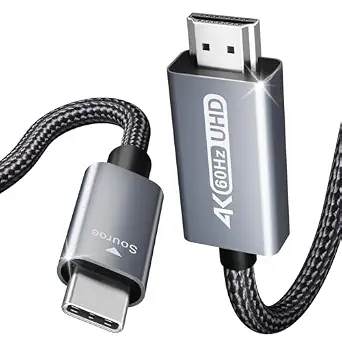 | Best for MacBook and iPad Owners | Cable Length: 6 ft | Max Resolution: 3840×2160 @ 60Hz; also 2K@144Hz, 1080P | Connector Type: USB-C to HDMI, one-way | VIEW ON AMAZON | See Our Full Breakdown |
| UANTIN USB C to HDMI Cable 6Ft for Home Office 4K High-Speed |  | Best Value Pick | Cable Length: 6 ft | Max Resolution: 4K @ 30Hz | Connector Type: USB-C (DP Alt Mode) to HDMI, one-way | VIEW ON AMAZON | See Our Full Breakdown |
| Warrky USB C to HDMI Cable 6FT, 4K@60Hz High-Speed |  | Best Overall | Cable Length: 6 ft | Max Resolution: 4K @ 60Hz; 1440P @ 144Hz; 1080P @ 240Hz | Connector Type: USB-C (DP Alt Mode) to HDMI, one-way | VIEW ON AMAZON | See Our Full Breakdown |
| UGREEN USB C to HDMI 2.0 Cable 4K@60Hz for Home Office, 6.6FT |  | Best Overall | Length: 6.6 ft | Max Resolution: 4K@60Hz (backward compatible with 2K@120Hz, 1080P) | HDMI Standard: HDMI 2.0 with HDCP 2.2/1.4, HDR, 3D | VIEW ON AMAZON | See Our Full Breakdown |
| Acer USB C to HDMI Cable for Home Office 6.6FT (4K@60Hz) |  | Best Value for 4K@60Hz | Length: 6.6 ft (also 3.3 ft / 10 ft) | Max Resolution: 4K@60Hz (backward compatible 1440P@60Hz, 1080P@120Hz) | Connector: USB-C male to HDMI male, one-way | VIEW ON AMAZON | See Our Full Breakdown |
| uni USB C to HDMI Cable, 4K High-Speed Type C to HDMI Cable for Home Office |  | Best for Light-Duty Desk Setups | Length: 6 ft class (braided, compact) | Max Resolution: 4K@30Hz | Connector: USB-C male to HDMI male, one-way | VIEW ON AMAZON | See Our Full Breakdown |
| Highwings USB-C to HDMI 2.0 Cable 6FT, 4K@60Hz |  | Most Durable Build | Length: 6 ft | Max Resolution: 3840×2160 @ 60Hz (4K), backward compatible 4K@30Hz, 2K@120Hz, 1080P | HDMI Version: HDMI 2.0 | VIEW ON AMAZON | See Our Full Breakdown |
| UANTIN USB C to HDMI Cable 6Ft for Home Office 4K High-Speed 2-Pack |  | Best Multi-Room Bundle | Length: 6 ft per cable (also 3/6.6/10/15/20/25 ft) | Quantity: 2-pack | Max Resolution: 4K@30Hz | VIEW ON AMAZON | See Our Full Breakdown |
| usbc to hdmi cables 6foot | Max Resolution | Compatibility | Length |
|---|---|---|---|
| Cable Matters Unidirectional 4 | 4K @ 60Hz (3840×2160), 2K @ 144Hz | Thunderbolt 3/4, USB4, USB-C with DP Alt Mode | 6 ft |
| 2 Pack USB-C to HDMI Cable 6ft | 4K @ 60Hz (3840×2160) | Thunderbolt 3/4, USB-C with DP Alt Mode | 6 ft (x2 cables) |
| Anker HDMI Cable | 4K @ 60Hz with HDR | Thunderbolt 3, 4, and 5; USB-C with DP Alt Mode | 3 ft |
| Acer USB C to HDMI 2.1 Cable 6 | 8K @ 60Hz, 4K @ 240Hz/120Hz | Thunderbolt, USB-C with DP Alt Mode; MacBook Pro, iPhone 15-17 Pro, Galaxy S23+, Surface, ThinkPad, XPS | 6.6 ft |
| Cable Matters Unidirectional U | 8K @ 60Hz, 4K @ 240Hz (4K@60Hz max on macOS) | Thunderbolt 5/4, USB4, Nvidia RTX 4000 series, AMD RX 7000 series, Intel Iris Xe | 6 ft |
| Amazon Basics Premium Aluminum | 4K @ 60Hz | Thunderbolt 3, DP Alt Mode USB-C devices | — |
| SWITCHFLUX USB C to HDMI Cable | 3840×2160 @ 60Hz (4K UHD) | Thunderbolt 3/4, iPhone 15 series, MacBook, iPad Pro, Dell XPS, Surface, Galaxy S series | — |
| BENFEI USB C to HDMI 6 Feet Ca | 3840×2160 @ 60Hz; also 2K@144Hz, 1080P | Thunderbolt 3/4/5, MacBook, iPad Pro, iPhone 15 Pro, Dell XPS, Surface, Galaxy S series | — |
| UANTIN USB C to HDMI Cable 6Ft | 4K @ 30Hz | Thunderbolt 3/4/5, MacBook, iPhone 15+, iPad Pro, Surface, Dell XPS, Galaxy S, Steam Deck | — |
| Warrky USB C to HDMI Cable 6FT | 4K @ 60Hz; 1440P @ 144Hz; 1080P @ 240Hz | Thunderbolt 3/4, iPhone 15/16/17, MacBook, iPad Pro, Surface, Dell XPS, Galaxy S series, Steam Deck | — |
| UGREEN USB C to HDMI 2.0 Cable | 4K@60Hz (backward compatible with 2K@120Hz, 1080P) | Thunderbolt 5/4/3 and DP Alt Mode devices (iPhone 15+, MacBook, iPad, Steam Deck, Galaxy) | 6.6 ft |
| Acer USB C to HDMI Cable for H | 4K@60Hz (backward compatible 1440P@60Hz, 1080P@120Hz) | Thunderbolt 3/4/5 and DP Alt Mode laptops, iPads, iPhones, Galaxy, Steam Deck | 6.6 ft (also 3.3 ft / 10 ft) |
| uni USB C to HDMI Cable | 4K@30Hz | DP Alt Mode laptops, iPhone 15 Pro, MacBook, iPad, Galaxy, XPS | 6 ft class (braided, compact) |
| Highwings USB-C to HDMI 2.0 Ca | 3840×2160 @ 60Hz (4K), backward compatible 4K@30Hz, 2K@120Hz, 1080P | — | 6 ft |
| UANTIN USB C to HDMI Cable 6Ft | 4K@30Hz | Thunderbolt 3/4/5, MacBook, iPad Pro, iPhone 15/16/17 Pro, Galaxy S8–S25, Surface, Steam Deck | 6 ft per cable (also 3/6.6/10/15/20/25 ft) |
More Details on Our Top Picks
Cable Matters Unidirectional 4K USB C to HDMI Cable, 6ft
When a buyer just needs 4K@60Hz over six feet without overpaying for bandwidth they will never use, this is the pick I point to first. Cable Matters leans on HDMI 2.0 with 18Gbps bandwidth, which covers virtually every home office, classroom, and conference room scenario, and the full audio format support — DTS-HD Master Audio, Dolby TrueHD — makes it a safe bet for home theater use too. Compared with the Anker 3ft cord, this cable doubles the reach for desk-to-monitor setups that need cable slack. Unlike the HDMI 2.1 Acer or Cable Matters 8K options, it skips premium bandwidth, which is exactly why it earns the top slot for most buyers: you pay for reliability, not headroom. The tradeoff is that older Windows machines may need firmware and driver updates before it works, and it cannot feed 4K at high refresh rates.
Pros:- Stable 4K@60Hz output over the full 6-foot length with broad Thunderbolt 3/4 and USB4 support
- Full high-definition audio pass-through including Dolby TrueHD and DTS-HD Master Audio
- Extensive documented compatibility with Dell, MacBook, ThinkPad, Surface, and Samsung DeX
- Backwards compatible with 1080p and 720p displays
Cons:- Older Windows laptops may require BIOS, Thunderbolt firmware, and graphics driver updates
- Unidirectional only — cannot send video from HDMI back to a USB-C device
- No high-refresh support beyond 2K@144Hz
Best for: Home office workers and presenters who need a dependable 6-foot 4K@60Hz connection from a laptop to a monitor, TV, or projector
Not ideal for: Gamers wanting 4K@120Hz or 8K — this HDMI 2.0 cable tops out at 4K@60Hz and 2K@144Hz
- Length:6 ft
- Max Resolution:4K @ 60Hz (3840×2160), 2K @ 144Hz
- HDMI Version:HDMI 2.0
- Bandwidth:18 Gbps
- Compatibility:Thunderbolt 3/4, USB4, USB-C with DP Alt Mode
- Audio Support:SACD, DVD-Audio, DTS-HD Master Audio, Dolby TrueHD
- Signal Direction:One-way (USB-C source to HDMI display)
- Build:Braided jacket, black
Our verdict“The safest all-around choice for anyone who needs a proven 6-foot 4K@60Hz USB-C to HDMI link without paying for HDMI 2.1 headroom.”
2 Pack USB-C to HDMI Cable 6ft, 4K@60Hz Braided Cord (Thunderbolt 3/4 Compatible)
The pitch here is simple: two cables for roughly the price of one from name brands like BENFEI or Warrky. For households with a laptop upstairs and a dock downstairs, or for anyone who wants a spare in a travel bag, this bundle eliminates the second purchase entirely. Each cable holds its own against single-cable rivals — 4K@60Hz with HDR, gold-plated connectors, and nylon braiding rated for 10,000+ plug cycles. Compared with the Cable Matters pick, the spec sheet is nearly identical at HDMI 2.0, so the real differentiator is quantity rather than quality. The tradeoff is brand recognition and support: an unnamed manufacturer carries more long-term uncertainty than Cable Matters or Anker, and the compatibility list is narrower, with older MacBooks and some iPad generations left out.
Pros:- Two full-length 6ft cables in one purchase — ideal for multi-room or backup setups
- 4K@60Hz with HDR and audio pass-through matches pricier single cables
- Rugged build: braided nylon, aluminum housing, gold-plated connectors rated for 10,000+ cycles
- Plug-and-play with no driver installation
Cons:- Generic brand with less established warranty and support track record
- Compatibility list excludes older MacBooks (pre-2016) and some iPad generations
- Only HDMI 2.0 — no high-refresh or 8K support
Best for: Budget-conscious households or small offices that need matching cables in two rooms and a 4K@60Hz connection
Not ideal for: Buyers who prioritize established brand support and warranty service over getting two cables
- Length:6 ft (x2 cables)
- Max Resolution:4K @ 60Hz (3840×2160)
- HDMI Version:HDMI 2.0
- Compatibility:Thunderbolt 3/4, USB-C with DP Alt Mode
- Connectors:24K gold-plated, aluminum alloy housing
- Cable Type:Nylon braided
- Durability:10,000+ plug/unplug cycles tested
- Signal Direction:One-way (USB-C to HDMI)
Our verdict“The smart buy when you genuinely need two 6-foot 4K cables and don’t require a big-name brand behind them.”
Anker HDMI Cable, 4K@60Hz Ultra-Fast USB C to HDMI Cord, 3ft
Anker earns its slot through signal engineering and support rather than raw specs. The advanced multi-layer shielding — tinned copper conductor with dual aluminum and TPE layers — is aimed at buyers who have fought flickering or dropped connections with cheaper cables, and the Thunderbolt 3/4/5 compatibility covers machines well into the future. The catch, and it is a real one for this roundup: this cord is 3 feet, not 6. Set beside the Cable Matters 6-foot pick, it only makes sense when your laptop sits close to the display — a nightstand TV setup or a clutter-free desk. What you give up in reach, you gain in tidiness and an 18-month warranty backed by a brand with a strong service reputation, something the generic 2-pack cannot claim.
Pros:- Multi-layer shielding (tinned copper, dual aluminum, TPE) for stable, flicker-free mirroring
- Compatible with Thunderbolt 3, 4, and 5 ports
- 4K@60Hz with HDR for sharp, colorful streaming
- Nylon braided, corrosion-resistant build rated for 10,000 plug cycles with 18-month warranty
Cons:- Only 3 feet long — half the reach of every other cable in this lineup
- Premium brand pricing relative to spec-identical generic alternatives
- HDMI 2.0 ceiling only; no 8K or high-refresh output
Best for: Owners of Thunderbolt-equipped MacBooks or laptops who sit close to their display and value brand support and a tangle-free short cable
Not ideal for: Anyone routing a cable across a desk or room — 3 feet will not span a typical desk-to-TV distance
- Length:3 ft
- Max Resolution:4K @ 60Hz with HDR
- Compatibility:Thunderbolt 3, 4, and 5; USB-C with DP Alt Mode
- Conductor:Tinned copper
- Shielding:Dual-layer aluminum and TPE
- Build:Nylon braided, nickel-plated aluminum exterior
- Durability:10,000 plug cycles (internal lab testing)
- Warranty:18 months
Our verdict“Choose this when your device sits within arm’s reach of the screen and you want Anker’s build quality and warranty behind the connection.”
Acer USB C to HDMI 2.1 Cable 6.6FT (8K@60Hz 4K@240Hz) Unidirectional
This is the cable for buyers whose displays have outgrown HDMI 2.0. With 48Gbps bandwidth pushing 4K@240Hz or 8K@60Hz, plus HDR10+ and Dolby Vision, it targets high-refresh gaming monitors and 8K televisions where the Acer 4K@60Hz office cable and the Cable Matters HDMI 2.0 pick simply run out of room. The 48-ply nylon braid and aluminum casing for heat dissipation reflect a build meant for sustained gaming sessions, and the extra six inches over standard 6-foot cables helps with awkward desk routing. The tradeoffs mirror all HDMI 2.1 gear: 8K@60Hz only materializes when both the source device and display support it, and pairing it with a 60Hz office monitor wastes the entire reason to buy it. Buyers connecting ordinary 4K screens should save money with the standard Acer or BENFEI options instead.
Pros:- Full HDMI 2.1 bandwidth (48Gbps) for 8K@60Hz and 4K@240Hz/120Hz
- Dynamic HDR10+ and Dolby Vision support frame by frame
- 48-ply nylon braid and aluminum casing built for heat and abrasion resistance
- Supports both mirror and extended display modes with plug-and-play setup
Cons:- 8K@60Hz requires matching support from both the source device and display
- Overkill in cost and capability for 4K@60Hz office setups
- Unidirectional only — no reverse HDMI-to-USB-C signal path
Best for: PC gamers and home theater enthusiasts with a 4K@120Hz+ monitor or 8K TV who need full HDMI 2.1 bandwidth from a USB-C or Thunderbolt laptop
Not ideal for: Office users with standard 60Hz monitors — the extra bandwidth is wasted and cheaper HDMI 2.0 cables do the same job
- Length:6.6 ft
- Max Resolution:8K @ 60Hz, 4K @ 240Hz/120Hz
- HDMI Version:HDMI 2.1
- Bandwidth:48 Gbps
- HDR Support:Dynamic HDR10+, Dolby Vision
- Compatibility:Thunderbolt, USB-C with DP Alt Mode; MacBook Pro, iPhone 15-17 Pro, Galaxy S23+, Surface, ThinkPad, XPS
- Build:Aluminum casing, 48-ply nylon braided jacket
- Signal Direction:One-way (USB-C to HDMI)
Our verdict“The pick for high-refresh gaming and 8K home theater, provided your hardware can actually feed it more than 60Hz.”
Cable Matters Unidirectional USB C to HDMI 2.1 Cable, 6ft, Black
Think of this as the grown-up version of the 4K@60Hz Cable Matters pick — same brand, same 6-foot practicality, but with 8K@60Hz and 4K@240Hz capability and explicit support for Thunderbolt 5 and USB4, plus gaming features like ALLM for reduced latency. Where the Acer HDMI 2.1 cable emphasizes gaming flash, this one leans on verification and stability: each unit is inspected before shipment, and the documented compatibility with RTX 4000-series and Radeon RX 7000-series graphics makes it a safer bet for professional workstations. The honest tradeoff is macOS: it is capped at 4K@60Hz on Mac, so MacBook owners chasing high refresh rates need a different model entirely. Windows gamers and creators with modern GPUs get the full benefit; everyone else should question whether the extra bandwidth justifies the step up from HDMI 2.0.
Pros:- HDMI 2.1 bandwidth of 48Gbps supports 8K@60Hz and 4K@240Hz
- Thunderbolt 5, Thunderbolt 4, and USB4 compatibility for long-term relevance
- Gaming features including dynamic HDR and ALLM for low-latency play
- Individually inspected before shipment for consistent quality
Cons:- Limited to 4K@60Hz maximum on macOS devices
- Premium capability goes unused without a high-end GPU and HDMI 2.1 display
- Unidirectional design — cannot accept input from an HDMI source
Best for: Windows-based creators and gamers with RTX 4000/RX 7000-class graphics and Thunderbolt 4/5 laptops who want 8K or 4K@240Hz headroom
Not ideal for: MacBook users — macOS caps this cable at 4K@60Hz, making the cheaper HDMI 2.0 version the smarter buy
- Length:6 ft
- Max Resolution:8K @ 60Hz, 4K @ 240Hz (4K@60Hz max on macOS)
- HDMI Version:HDMI 2.1
- Bandwidth:48 Gbps
- Compatibility:Thunderbolt 5/4, USB4, Nvidia RTX 4000 series, AMD RX 7000 series, Intel Iris Xe
- Gaming Features:Dynamic HDR, ALLM (Auto Low Latency Mode)
- Signal Direction:One-way (USB-C source to HDMI display)
- Quality Control:Individually inspected before shipment
Our verdict“A future-proofed 6-foot HDMI 2.1 cable that makes sense only if your Windows hardware can actually push past 4K@60Hz.”
For buyers who just need a dependable, no-frills 4K@60Hz link, this Amazon Basics cable keeps things simple. It delivers the same core spec as pricier options like the Warrky 6FT — 4K at 60Hz over a single USB-C to HDMI cord — but skips the braided jacket and gold plating. That plain PVC exterior is the real tradeoff: compared with the SWITCHFLUX braided cable, it is more prone to kinking and less forgiving if it gets pinched under a desk leg or run along a high-traffic floor path.
What this pick makes the most sense for is a set-and-forget desktop setup, where the cable plugs in once and stays put. Thunderbolt 3 compatibility means MacBook and Dell XPS owners are covered, and the aluminum housing at each end is sturdier than the price bracket usually offers. Just confirm your port supports DisplayPort Alt Mode before ordering, since charging-only USB-C ports will produce a blank screen.
Pros:- Solid 4K@60Hz output with Thunderbolt 3 compatibility
- Aluminum connector housings add stiffness where it counts
- Simple plug-and-play operation with no drivers
- Unassuming black design blends into any desk setup
Cons:- Standard jacket is more vulnerable to fraying and kinking than nylon braiding
- No HDR support advertised, unlike some competitors
- Shorter effective lifespan if the cable is repeatedly coiled and packed
Best for: Students and home-office users who want a basic, affordable 4K@60Hz cable for a permanent desk monitor connection
Not ideal for: Frequent travelers or anyone routing cable along floors — the non-braided jacket lacks the durability of nylon-wrapped rivals
- Cable Length:6 ft
- Max Resolution:4K @ 60Hz
- Connector Type:USB-C (source) to HDMI (display), uni-directional
- Compatibility:Thunderbolt 3, DP Alt Mode USB-C devices
- Housing:Premium aluminum
- Conductors:Tinned copper with durable shielding
Our verdict“A sensible, low-risk pick for a permanent home-office monitor hookup where durability extras would go unused.”
SWITCHFLUX USB C to HDMI Cable 6Ft, 4K@60Hz
This SWITCHFLUX cable stakes its claim on build toughness. The combination of a one-piece aluminum alloy housing, 24K gold-plated connectors, and a nylon braided jacket rated for over 10,000 plug/unplug cycles makes it the option to beat for anyone who connects and disconnects daily. Compared with the Amazon Basics cable, the difference is tangible: where that pick is happy sitting still behind a desk, this one shrugs off being stuffed into a bag next to a laptop charger.
Performance sits at the expected 4K@60Hz benchmark with HDR and audio pass-through, plus 2K@120Hz for high-refresh gaming monitors. That said, it does not reach for anything beyond the standard HDMI 2.0 envelope — buyers chasing 8K or 4K@240Hz will want the Acer HDMI 2.1 cable instead. And like every cable in this roundup, it demands a host port with DisplayPort Alt Mode, which rules out many budget Windows laptops.
Pros:- 10,000+ cycle-rated braided construction for daily travel abuse
- HDR support with full audio pass-through at 4K@60Hz
- Gold-plated connectors resist corrosion over years of use
- Broad compatibility from iPhone 15 to Steam Deck-era hardware
Cons:- Capped at HDMI 2.0 bandwidth — no high-refresh 4K or 8K path
- One-way signal only, like the rest of the field
- Braided jacket makes the cable slightly stiffer to route around tight corners
Best for: Hybrid workers and students who pack a cable daily and need one that survives constant plugging, coiling, and travel
Not ideal for: Owners of budget laptops whose USB-C ports lack DP Alt Mode — the cable will not output video at all
- Cable Length:6 ft
- Max Resolution:3840×2160 @ 60Hz (4K UHD)
- Connector Type:USB-C (DP Alt Mode) to HDMI
- Housing:Aluminum alloy one-piece
- Connectors:24K gold-plated
- Cable Jacket:Nylon braided
- Durability:10,000+ plug/unplug cycles tested
- Compatibility:Thunderbolt 3/4, iPhone 15 series, MacBook, iPad Pro, Dell XPS, Surface, Galaxy S series
Our verdict“The pick for buyers whose cable lives in a backpack, not behind a desk, and who value long-term durability over cutting-edge bandwidth.”
BENFEI USB C to HDMI 6 Feet Cable, 4K@60Hz, Gray
BENFEI earns its spot through one of the most explicitly documented Apple compatibility lists in this roundup, covering everything from the iPhone 15 Pro Max back through MacBook Pro 2016, iPad Pro 2018, and even iMac and Mac Mini. Apple users who have been burned by vague compatibility claims elsewhere will appreciate that precision. The internals matter too: an advanced IC chip handles the signal conversion, thicker copper wire minimizes loss, and the aluminum shell doubles as a heat sink during long streaming sessions.
Versus the UANTIN cable, BENFEI holds the 4K@60Hz line where UANTIN tops out at 30Hz — a real difference for anyone moving a mouse across an extended display. The tradeoff is a connector housing that runs bulkier than slim alternatives, which can be awkward on iPols in cases or tight monitor recesses. The bundled Velcro tie and 18-month warranty round out a package aimed at long-term ownership rather than flash.
Pros:- Explicitly documented compatibility across six years of Apple hardware
- Full 4K@60Hz plus 2K@144Hz for high-refresh monitors
- 18-month unconditional warranty with accessible support
- Heat-dissipating aluminum shell suited to all-day use
Cons:- Bulky connector can block adjacent ports
- Nickel-plated rather than gold-plated connectors, a small step down from SWITCHFLUX
- One-way design with no return-signal capability
Best for: MacBook, iPad Pro, and iPhone 15 owners who want verified compatibility and a long warranty for a permanent dual-monitor setup
Not ideal for: Users with tight port spacing or thick device cases — the connector housing is wider than slimmer rivals
- Cable Length:6 ft
- Max Resolution:3840×2160 @ 60Hz; also 2K@144Hz, 1080P
- Connector Type:USB-C to HDMI, one-way
- Data Transfer Rate:18 Gbps
- Shell:Aluminum with uni-body molding
- Cable Jacket:Nylon braided, gray
- Compatibility:Thunderbolt 3/4/5, MacBook, iPad Pro, iPhone 15 Pro, Dell XPS, Surface, Galaxy S series
- Warranty:18 months, unconditional
Our verdict“The safest choice for Apple-centric buyers who prioritize verified device compatibility and warranty backing over a slim connector profile.”
UANTIN USB C to HDMI Cable 6Ft for Home Office 4K High-Speed
The UANTIN makes the list by being honest about what most people actually need. Its 4K@30Hz ceiling is the lowest refresh rate in this batch — and for presentations, streaming video, and static documents, that limitation is barely noticeable. Where the Warrky cable charges a premium for 60Hz, UANTIN delivers a flicker-free, EMI-shielded picture with the same braided nylon and aluminum build quality for buyers who simply do not move a cursor across a second screen.
That framing matters: this is not the cable for extended-display productivity, where 30Hz mouse movement feels visibly laggy. It also explicitly excludes portable monitors, which trips up some buyers. But for mirroring a laptop to a conference-room TV or watching content on a projector, the savings logic is sound. The 10,000-bend rating and slim travel-friendly footprint mean it holds up on the road better than the stiffer Amazon Basics option at a similar price point.
Pros:- Most affordable route to a 4K picture in this lineup
- Braided nylon and aluminum build punches above its price class
- Slim and light enough for a laptop sleeve or pocket
- EMI shielding delivers stable, flicker-free mirroring
Cons:- Capped at 4K@30Hz — half the refresh rate of BENFEI or Warrky
- Portable monitors are explicitly unsupported
- No HDR support
Best for: Presenters and casual streamers who mirror their screen to a TV or projector and do not need 60Hz smoothness
Not ideal for: Extended-desktop workers and gamers — 4K@30Hz makes cursor movement and fast content feel choppy
- Cable Length:6 ft
- Max Resolution:4K @ 30Hz
- Connector Type:USB-C (DP Alt Mode) to HDMI, one-way
- Housing:Aluminum alloy, gold-plated connectors
- Cable Jacket:Braided nylon, 10,000+ bend rated
- Compatibility:Thunderbolt 3/4/5, MacBook, iPhone 15+, iPad Pro, Surface, Dell XPS, Galaxy S, Steam Deck
- Other Lengths:3ft / 6ft / 6.6ft / 10ft / 15ft / 20ft / 25ft
Our verdict“A smart value play for screen mirroring and media playback, as long as 30Hz refresh will not bother your workflow.”
Warrky USB C to HDMI Cable 6FT, 4K@60Hz High-Speed
This is the cable I would point most buyers toward first, because it nails the full HDMI 2.0 feature set without a premium price or a headline spec nobody uses. Beyond 4K@60Hz, it supports 1440p@144Hz and 1080p@240Hz — refresh rates that matter to gamers and anyone sensitive to motion smoothness — plus HDCP compliance for protected streaming content, something the UANTIN does not address. Against the SWITCHFLUX, Warrky matches the braided jacket, gold-plated connectors, and aluminum heat dissipation while backing it with a stated 18-hour support response commitment.
The engineering details translate into real outcomes: thicker copper wire keeps signal loss invisible over the full six feet, and the non-slip thumb grip makes plugging into recessed monitor ports less fiddly. The drawbacks are modest but real — it is a one-way cable like everything else here, and the braided jacket is stiffer than the rubberized Amazon Basics, so tight bend radii behind a wall-mounted TV take some persuasion. For a do-everything home-office cable, it is the balanced choice.
Pros:- Full HDMI 2.0 range: 4K@60Hz, 1440p@144Hz, 1080p@240Hz
- HDCP compliant for Netflix and other protected streams
- Thicker copper conductors minimize signal loss at full length
- Responsive support with 18-hour response commitment and included Velcro tie
Cons:- Stiff braided jacket complicates tight routing
- One-way signal path only
- Connector housing slightly bulkier than minimalist options like uni’s cable
Best for: Buyers who want one cable that handles 4K work monitors, high-refresh gaming displays, and HDCP streaming without compromise
Not ideal for: Installations needing tight bends behind wall-mounted TVs — the stiff braided jacket resists sharp angles
- Cable Length:6 ft
- Max Resolution:4K @ 60Hz; 1440P @ 144Hz; 1080P @ 240Hz
- Connector Type:USB-C (DP Alt Mode) to HDMI, one-way
- Connectors:Gold-plated, uni-body molded
- Shell:Aluminum, heat-dissipating, gray with blue accent
- Cable Jacket:Nylon braided with non-slip thumb grip
- HDCP:Compliant
- Compatibility:Thunderbolt 3/4, iPhone 15/16/17, MacBook, iPad Pro, Surface, Dell XPS, Galaxy S series, Steam Deck
Our verdict“The most complete all-rounder in the roundup — equally credible for a 240Hz gaming monitor and a Friday-night movie stream.”
UGREEN USB C to HDMI 2.0 Cable 4K@60Hz for Home Office, 6.6FT
The UGREEN 6.6FT earns the top spot because it gets the fundamentals right without overreaching: HDMI 2.0 bandwidth, HDR and HDCP 2.2 support, and a braided nylon jacket over aluminum housings. Compared with the uni cable, the extra headroom of 4K@60Hz matters more than most buyers expect — 30Hz desktop scrolling feels noticeably less fluid on a 4K monitor. The non-slip grips on each connector sound minor, but they make repeated plugging into a docked laptop or a Steam Deck far less fiddly than smooth plastic shells. The tradeoff is honest rather than hidden: this is a unidirectional cable, so USB-C must always be the source, and there’s no charging passthrough. Still, for a single do-everything cord that handles a MacBook, an iPad Pro, and a Galaxy phone, this is the pick I’d put my money on.
Pros:- True 4K@60Hz with HDR and HDCP 2.2 for protected streaming content
- Braided nylon with aluminum casing and non-slip grips built for daily plug cycles
- Works across iPhones, MacBooks, iPads, Steam Deck, and Galaxy phones
- Built-in IC chip keeps the signal stable over the full 6.6-foot run
Cons:- Unidirectional — USB-C must be the source, HDMI the display
- No power delivery, so phones drain while mirrored to a TV
- Requires DP Alt Mode on the host, which rules out many budget USB-C ports
Best for: Home office users who want one cable that handles a 4K@60Hz monitor, HDR streaming, and phone-to-TV mirroring across mixed devices
Not ideal for: Anyone hoping to run 8K or high-refresh 4K gaming displays — the Acer HDMI 2.1 cable in this roundup covers that ground instead
- Length:6.6 ft
- Max Resolution:4K@60Hz (backward compatible with 2K@120Hz, 1080P)
- HDMI Standard:HDMI 2.0 with HDCP 2.2/1.4, HDR, 3D
- Connector:USB-C male to HDMI male, unidirectional
- Build:Braided nylon, aluminum alloy casing, non-slip grips
- Compatibility:Thunderbolt 5/4/3 and DP Alt Mode devices (iPhone 15+, MacBook, iPad, Steam Deck, Galaxy)
- Requirements:USB-C port must support DisplayPort Alternate Mode
Our verdict“If you want a single 6-foot USB-C to HDMI cable that does everything well at 4K@60Hz, this is the safest all-around choice.”
Acer USB C to HDMI Cable for Home Office 6.6FT (4K@60Hz)
What makes the Acer 6.6FT appealing is that it delivers the same 4K@60Hz ceiling as the UGREEN and the Highwings for typically less outlay, and it even throws in 1080P@120Hz for high-refresh gaming at lower resolutions. The braided jacket and reinforced strain reliefs hold up against repeated desk-duty abuse, and plug-and-play behavior means no drivers, no fiddling. Where it cuts corners compared with the UGREEN is feature depth: no HDR support, which dulls highlights on an HDR TV, and a shorter compatibility leash — no docks, hubs, or Motorola phones. Against the UANTIN 2-pack, you’re choosing one better-specified cable over two more basic ones. For a buyer with one laptop and one monitor, that single stronger cable is usually the smarter spend.
Pros:- Full 4K@60Hz plus 1080P@120Hz for high-refresh gaming monitors
- Reinforced connectors and braided build resist fraying at the strain points
- Available in multiple lengths (3.3/6.6/10 ft) to match different setups
- Plug-and-play with HDCP compliance for protected streaming
Cons:- No HDR support, so HDR content falls back to standard dynamic range
- Does not work with docks, hubs, docking stations, or Motorola phones
- Cannot charge the connected device while in use
Best for: Students and home-office workers who need one dependable 4K@60Hz connection between a laptop and a monitor without paying for premium extras
Not ideal for: HDR movie watchers or anyone routing through a dock or hub — the UGREEN’s HDR support or a dedicated dock cable serves them better
- Length:6.6 ft (also 3.3 ft / 10 ft)
- Max Resolution:4K@60Hz (backward compatible 1440P@60Hz, 1080P@120Hz)
- Connector:USB-C male to HDMI male, one-way
- Build:Braided cable, reinforced connectors, aluminum/copper shielding
- Compatibility:Thunderbolt 3/4/5 and DP Alt Mode laptops, iPads, iPhones, Galaxy, Steam Deck
- HDR Support:No
- Limitations:No dock/hub support, no charging, no Lightning
Our verdict“A sensible mid-list pick that matches pricier cables on refresh rate while skipping HDR — ideal when your monitor isn’t HDR anyway.”
uni USB C to HDMI Cable, 4K High-Speed Type C to HDMI Cable for Home Office
The uni cable sits lower in this lineup for one straightforward reason: it tops out at 4K@30Hz, half the refresh rate of the UGREEN, Acer, and Highwings options. For presentations, slideshows, and mirrored movie watching on a TV, that limitation barely registers — video playback is smooth because 24/30fps content matches the panel. But drag a window across a 4K monitor at 30Hz and the stutter is immediately obvious. What uni gets right is the 18-month warranty with fast support response, plus a handy indicator light on the USB-C connector that confirms the host is actually outputting video — a genuinely useful touch when troubleshooting why a phone won’t mirror. Compared with the equally 30Hz UANTIN single cable, uni’s support reputation and slimmer connector give it the edge for buyers who value help when things go wrong.
Pros:- Connector indicator light confirms active video output for easy troubleshooting
- 18-month warranty with responsive customer support
- Compact, light braided design that travels well in a laptop bag
- Plug-and-play mirroring and extend modes with no drivers
Cons:- Capped at 4K@30Hz, well behind the 60Hz standard set by other picks
- No HDR support
- Not compatible with docks, hubs, or portable monitors
Best for: Occasional presenters and TV-mirroring users who mostly watch video rather than work on a 4K desktop
Not ideal for: Anyone using a 4K monitor as a primary workspace — 30Hz scrolling and cursor movement feel sluggish next to the 60Hz options here
- Length:6 ft class (braided, compact)
- Max Resolution:4K@30Hz
- Connector:USB-C male to HDMI male, one-way
- Build:Braided nylon, aluminum housing
- Special Feature:Power/status indicator light on USB-C connector
- Warranty:18 months
- Compatibility:DP Alt Mode laptops, iPhone 15 Pro, MacBook, iPad, Galaxy, XPS
Our verdict“Fine for couch mirroring and conference-room slideshows, but desktop 4K workers should step up to a 60Hz option.”
Highwings USB-C to HDMI 2.0 Cable 6FT, 4K@60Hz
If your cables live a hard life — coiled into a bag daily, stepped on, pinched under desk legs — the Highwings 6FT is built for that reality. Its 25,000+ bend rating, tangle-resistant flat braided design, and gold-plated connectors in aerospace-grade aluminum put it ahead of the round-finish UGREEN and Acer on sheer survivability. Signal-wise it’s a match for both: 4K@60Hz over HDMI 2.0 with clean, flicker-free output, plus 2K@120Hz for gaming displays. The compromises are structural rather than performance-based. The flat braid, while tough, is slightly stiffer to route along tight corners, and the 1-year warranty is shorter than uni’s 18 months — a curious gap given the rugged positioning. Still, for a cable that gets hauled between a living room TV, a projector, and an office monitor in the same week, durability beats every other metric here.
Pros:- 25,000+ bend rating with tangle-resistant flat braided construction
- Gold-plated connectors and aluminum casing resist corrosion and heat
- Full 4K@60Hz plus 2K@120Hz for gaming displays
- Broad device support spanning iPhones, MacBooks, iPads, and Galaxy phones
Cons:- Only a 1-year warranty despite the rugged positioning
- Flat braid is stiffer and harder to route than round cables
- Unidirectional with no charging passthrough
Best for: Frequent travelers and multi-room users who constantly coil, uncoil, and relocate their cable and need it to survive the abuse
Not ideal for: Buyers wanting long-term warranty peace of mind or a cable that bends neatly around tight AV-cabinet corners
- Length:6 ft
- Max Resolution:3840×2160 @ 60Hz (4K), backward compatible 4K@30Hz, 2K@120Hz, 1080P
- HDMI Version:HDMI 2.0
- Connector:USB-C male to HDMI male, unidirectional
- Cable Material:Braided nylon, tangle-resistant flat design, rated 25,000+ bends
- Casing:Aerospace-grade aluminum, gold-plated ports
- Warranty:1 year
Our verdict“The toughest cable in this batch — pick it if your cord gets packed up and moved constantly, not if it lives permanently behind a desk.”
UANTIN USB C to HDMI Cable 6Ft for Home Office 4K High-Speed 2-Pack
The UANTIN 2-pack solves a problem none of the single-cable picks address: coverage in two places. One cord for the living room TV, one for the office monitor — no more shuttling a single cable between rooms or borrowing it from a family member. The construction is credible for the price tier, with aluminum housing, gold-plated connectors, and braided nylon rated for 10,000+ bends, along with shielding that keeps Wi-Fi and EMI interference from causing flicker mid-presentation. But the spec sheet reveals where the savings come from: 4K@30Hz, the same ceiling as the uni cable and half the refresh rate of the Acer or Highwings. There’s also no HDR. Against the generic 2 Pack 4K@60Hz option elsewhere in this roundup, UANTIN’s cleaner compatibility documentation and Samsung DeX guidance give it an edge for Galaxy owners — just know you’re buying convenience and quantity, not cutting-edge bandwidth.
Pros:- Two cables for the price of one, ideal for multi-room or home-plus-travel setups
- Aluminum and braided build rated for 10,000+ bends
- EMI shielding delivers flicker-free, audio-synced output for presentations
- Documented Samsung DeX support with clear mirroring instructions
Cons:- Capped at 4K@30Hz across both cables
- No HDR and no charging passthrough
- Bend rating trails the Highwings’ 25,000-cycle claim
Best for: Households that need identical cables in two rooms, or Galaxy owners who want a spare for travel with DeX-friendly setup guidance
Not ideal for: 4K monitor workers or PC gamers — 30Hz output will feel noticeably less fluid than the 60Hz Acer or Highwings cables
- Length:6 ft per cable (also 3/6.6/10/15/20/25 ft)
- Quantity:2-pack
- Max Resolution:4K@30Hz
- Connector:USB-C male to HDMI male, unidirectional
- Build:Braided nylon, aluminum alloy housing, gold-plated connectors, 10,000+ bend rating
- Shielding:EMI and Wi-Fi interference rejection
- Compatibility:Thunderbolt 3/4/5, MacBook, iPad Pro, iPhone 15/16/17 Pro, Galaxy S8–S25, Surface, Steam Deck
Our verdict“Buy this when having two working cables in two rooms matters more than having the fastest one — 4K desktop users should look elsewhere.”

How We Picked
I evaluated each cable against four buyer-relevant criteria. First, signal capability: whether the cable supports 4K@30Hz, 4K@60Hz, or the full HDMI 2.1 spec, since refresh rate directly affects gaming smoothness and desktop responsiveness. Second, build quality: braided nylon jackets, aluminum connector shells, and reinforced strain reliefs all predict how a cable survives daily plugging, bending, and travel. Third, fit for the six-foot use case: cables were judged on whether their flexibility, connector size, and length actually suit desk-to-display or couch-to-TV distances. Fourth, value: single cables were weighed against multi-packs, and premium 2.1 models were judged on whether their extra bandwidth justifies the cost for real buyers.
Ranking followed role clarity. The best overall pick needed strong scores across all four criteria without a weak spot, while value picks could trade premium materials for a lower per-cable cost. Premium picks earned their place only when their extra bandwidth (8K or 4K@240Hz) served a genuine buyer need, not just spec-sheet appeal. One notable exception: the 3-foot Anker cable was included and flagged honestly, because its length deviates from the six-foot brief — a real drawback for some buyers, an advantage for others.
Factors to Consider When Choosing Usbc To Hdmi Cables 6foot
Before picking a specific cable, it helps to understand what actually separates these products and where buyers commonly go wrong. These are the factors that matter most when choosing a 6-foot USB-C to HDMI cable.
Resolution and Refresh Rate: Match the Cable to Your Display
The single most common mistake is buying an HDMI 2.0 cable (4K@60Hz max) for a high-refresh gaming monitor, then wondering why 4K@144Hz won’t display. HDMI 2.1 cables — like the Acer and Cable Matters 2.1 models in this roundup — carry roughly two and a half times the bandwidth of 2.0 cables, which is what enables 4K@120Hz and above. If your display is a standard 60Hz office monitor or TV, that extra bandwidth is wasted money. Check your monitor’s actual maximum refresh rate before paying for headroom you’ll never use. Conversely, avoid any 4K@30Hz cable if you plan to use the display as your main workspace — the cursor lag at 30Hz is immediately noticeable and fatiguing. Matching the cable spec to the display, not exceeding it, is the goal.
Build Quality Determines Lifespan, Not Performance
A cable’s jacket and connectors don’t affect picture quality, but they overwhelmingly determine whether the cable survives a year of daily use. Nylon braiding resists kinking and tangling, while aluminum connector shells dissipate heat and resist cracking where budget plastic housings fail first. The failure point on nearly every cheap cable is the strain relief — the short section where the cable meets the plug — which is why the braided options in this lineup rank higher for durability despite identical signal specs. If the cable will live permanently behind a desk and never move, build quality matters less and a budget option is fine. But for cables that get coiled into a laptop bag weekly, spending a little more on braiding pays for itself by avoiding a replacement purchase. Frequent travelers should treat build quality as the top criterion after signal capability.
Cable Length: Six Feet Isn’t Always Right
Six feet is the most popular length because it bridges desk-to-monitor and couch-to-TV distances, but measure your actual run before buying. A cable stretched taut puts constant tension on both connectors, which accelerates wear and can cause intermittent signal drops. On the other hand, excess cable coiled behind a TV traps heat and collects dust. If your laptop sits close to your monitor — a docking-style setup — a 3-foot cable like the Anker option keeps the desk dramatically cleaner. For projector or wall-mounted TV setups, you may need a longer run, in which case an active cable (with built-in signal amplification) is safer than a passive 15-footer. The right move is to measure the route the cable will take, including any bends around furniture, then add about a foot of slack.
Unidirectional Means Exactly That
Nearly every cable in this category is unidirectional: USB-C must connect to the source (your laptop, tablet, or phone) and HDMI to the display, and the cable will not work in reverse. Some buyers assume an HDMI-to-USB-C direction exists for capturing video from a camera or console into a laptop — that requires a capture device, not a passive cable, and no product in this roundup does it. Additionally, the USB-C end only works with ports that support DisplayPort Alt Mode; a port that’s charge-only or data-only won’t output video at all. This catches buyers with older or budget Windows laptops where only some USB-C ports carry video. Check your laptop’s specifications for DisplayPort Alt Mode support before buying any cable on this list, no matter how good its specs are.
Single Cable vs Multi-Pack: The Value Math
Multi-packs like the braided 2-pack and the UANTIN 2-pack in this lineup typically cost less per cable than buying two singles, and HDMI cables rarely fail on their own timeline — having a spare in a drawer is genuinely useful. The pack makes sense if you have a home office and a TV setup, share a household with multiple laptop users, or want a backup for travel. The single premium cable makes more sense if you’re buying one known-good cable for a fixed workstation and care about maximum bandwidth. One caution: don’t buy a multi-pack of budget PVC cables just for the price — two fragile cables aren’t better value than one durable braided one if both fail within a year. Weigh the per-cable cost against the build quality, not just the unit count.
Device Compatibility Nuances Beyond the Basics
While all fifteen cables here support Thunderbolt 3/4/5 ports and DisplayPort Alt Mode, real-world compatibility has edges worth knowing. Some phones output a desktop-style interface over HDMI while others mirror at a fixed aspect ratio, and neither is a limitation of the cable itself. M1/M2 base-model MacBooks support only one external display natively, so a fancier cable won’t add a second monitor. iPads behave differently across generations, and a few older Android phones cap output at 1080p regardless of cable spec. Finally, HDCP compliance matters for streaming services: all major-brand cables handle it, but an unusually cheap unbranded cable can occasionally cause Netflix or Disney+ to block playback. Sticking with established accessory brands sidesteps this entirely.
Frequently Asked Questions
Will a 4K@60Hz USB-C to HDMI cable work with my 144Hz gaming monitor?
It will work, but not at the refresh rate you bought the monitor for. A 4K@60Hz cable is built to the HDMI 2.0 spec, which caps out at 60 frames per second at 4K resolution — the monitor will display, but at 60Hz, losing the smoothness you paid a premium for. To actually run 4K at 120Hz or 144Hz, you need an HDMI 2.1 cable like the Acer or Cable Matters 2.1 models in this roundup, which carry the extra bandwidth those refresh rates demand. There’s no damage risk in using a lower-spec cable; the system simply negotiates down to the highest mutually supported mode. If high-refresh gaming is the primary use case, treat HDMI 2.1 as a requirement, not an upgrade.
Why won’t my USB-C to HDMI cable work with one of my laptop’s ports?
Almost certainly because that specific port doesn’t support DisplayPort Alt Mode. Not all USB-C ports are equal: some handle charging only, some handle data only, and only some carry video output. Many Windows laptops mix port types on the same chassis — the left-side port may output video while the right-side one won’t, even though they look identical. Check the port for a small monitor or lightning-bolt icon, or consult the laptop’s specifications page for DisplayPort Alt Mode support. This is the single most common reason a perfectly good cable gets returned as defective, so rule it out before assuming the cable is the problem.
Is a more expensive cable going to give me a better picture?
No — within a given spec, picture quality is digital and binary: the signal either arrives intact or it doesn’t. A $12 4K@60Hz cable and a premium 4K@60Hz cable produce identical images when both work. Where price does matter is bandwidth ceiling (HDMI 2.1 costs more than 2.0), build durability (braided jackets and aluminum shells outlast PVC), and connector fit consistency. Over longer runs, better-shielded cables resist interference that can cause dropouts or flicker, but at six feet that risk is minimal for any reputable brand. Spend more for durability or bandwidth, never for imagined image quality improvements.
Do these cables charge my laptop or transmit data at the same time?
They don’t. These are unidirectional video-only cables: they carry display signal from USB-C to HDMI and nothing else. There’s no power delivery, so your laptop battery will drain while connected to the TV, and there’s no USB data channel for peripherals. If you need charging plus video over one connection, you want a USB-C hub or docking station with an HDMI output and a power-delivery passthrough port, which is a different product category entirely. The same applies to audio: sound travels with the HDMI video signal to your TV or monitor’s speakers, but the cable can’t feed audio back to a separate system. Plan your power situation before settling on a plain cable for long sessions.
Should I buy one braided cable or a two-pack of standard cables?
It depends on how many locations you’re wiring and how often the cable moves. A single braided cable makes sense for a primary workstation where one cable stays connected permanently and durability matters most — braiding and aluminum shells survive daily plugging far better than PVC. A two-pack wins if you have two display locations (say, a home office monitor and a living room TV), want a travel spare, or share the household with another laptop user, since the per-cable cost drops meaningfully. The compromise option is a two-pack that’s also braided, which appears in this roundup and covers both needs. Avoid the false economy of buying two fragile cables purely for the unit count if both will be handled daily — one durable cable outlasts two disposable ones.
Conclusion
For most buyers, the Cable Matters Unidirectional 4K USB-C to HDMI Cable (6ft) is the best overall choice — it nails the 4K@60Hz sweet spot with dependable connectors and no meaningful weaknesses. If value is the priority, the 2-pack braided 4K@60Hz cables (or the UANTIN 2-pack) cost less per cable and cover a second room, making them the smart pick for multi-location households. The Acer HDMI 2.1 cable is the premium choice, worth it only for high-refresh gaming monitors or 8K displays that can actually use its bandwidth. For beginners who just want something that works without research, the Amazon Basics 6-foot cable offers a safe, well-supported starting point. For specific needs: the Anker 3-foot cable suits a fixed desk setup where a longer cable is clutter, the BENFEI braided cable fits frequent travelers, and the Warrky or UGREEN options serve home-office buyers who want mid-tier build without premium pricing. Match the pick to your display, your desk layout, and how often the cable will move — that’s the whole decision.
NFL season / tailgating Picks
team gear
As an affiliate, we earn on qualifying purchases.